v0.1.0 MIT
End-to-end tests that read like a QA checklist.
Write what should happen. An agent drives a real browser through agent-browser, judges the screen like a person, and checks the console, network and app state like a test.
cargo install --git https://github.com/jaivial/qaspec --tag v0.1.0 For teams who want end-to-end checks without maintaining selectors. One Rust binary, one browser per run.
import { suite, step, goal, expect, capture } from 'qaspec';

// Agent-driven journey: several checks in order, sharing the browser state.
suite('todos journey', { as: 'qa', start: '/' }, () => {
  step('go to the todo list', () => {
    goal('open the Todos page from the navigation');
    expect('the Todos page lists at least one todo');
    expect.url().toContain('/todos');
  });

  step('add a todo', () => {
    goal('add a new todo with the text "${params.todo} ${run.id}"');
    expect('the list now contains "${params.todo} ${run.id}"');
    expect.network('POST /api/todos').status(201);
    expect.storage.local('lastTodo').equals('${params.todo} ${run.id}');
    expect.console.noErrors();
    capture('first', 'the text of the first todo in the list');
  });

  step('home reflects the new count', { start: '/' }, () => {
    expect('the welcome page says how many todos the user has, and it is more than 1');
    expect.visible('Welcome');
  });
});
What the agent does with that spec#
Screenshots from the run below, against the small demo app in tests/fixtures/app.
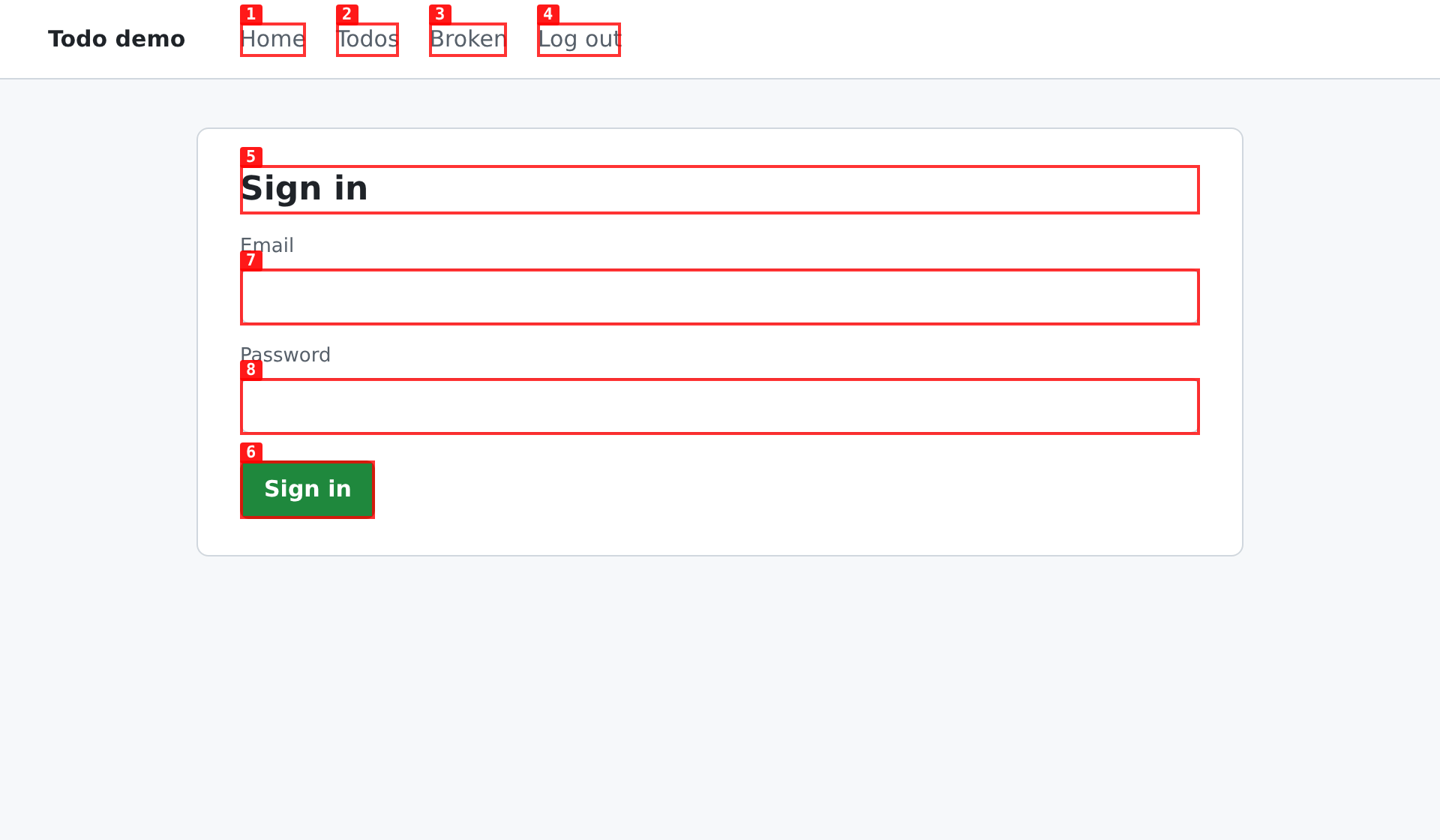
1Sign in once
agent-browser labels every control. The agent types the username and fills the password with
fill_secret, so it never sees it. The session is saved and the next run starts signed in.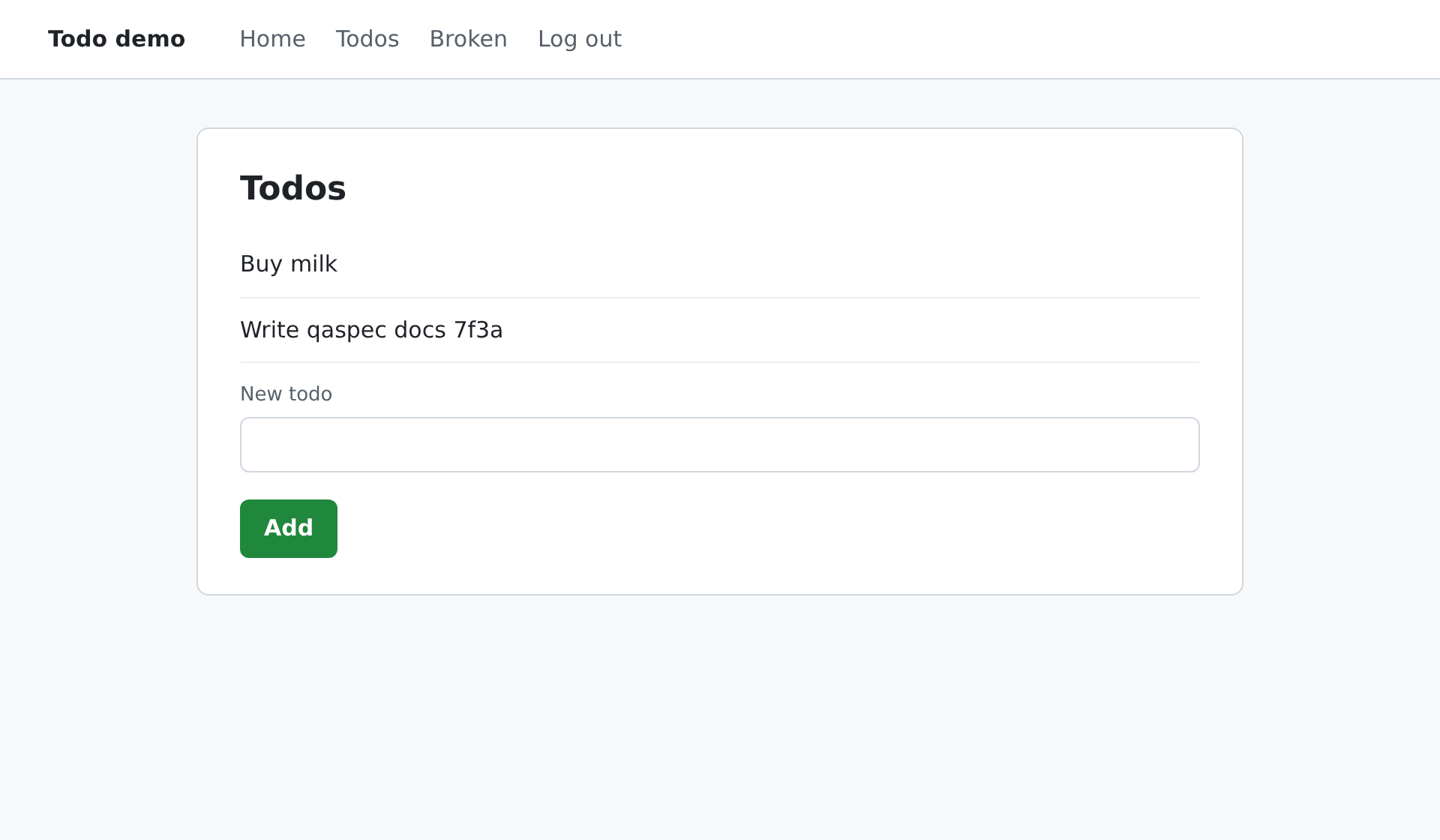
2Reach the goal
For
goal('add a todo …')the agent fills the input and presses Add. qaspec checks thatPOST /api/todosreturned 201 and that no console error fired during the step.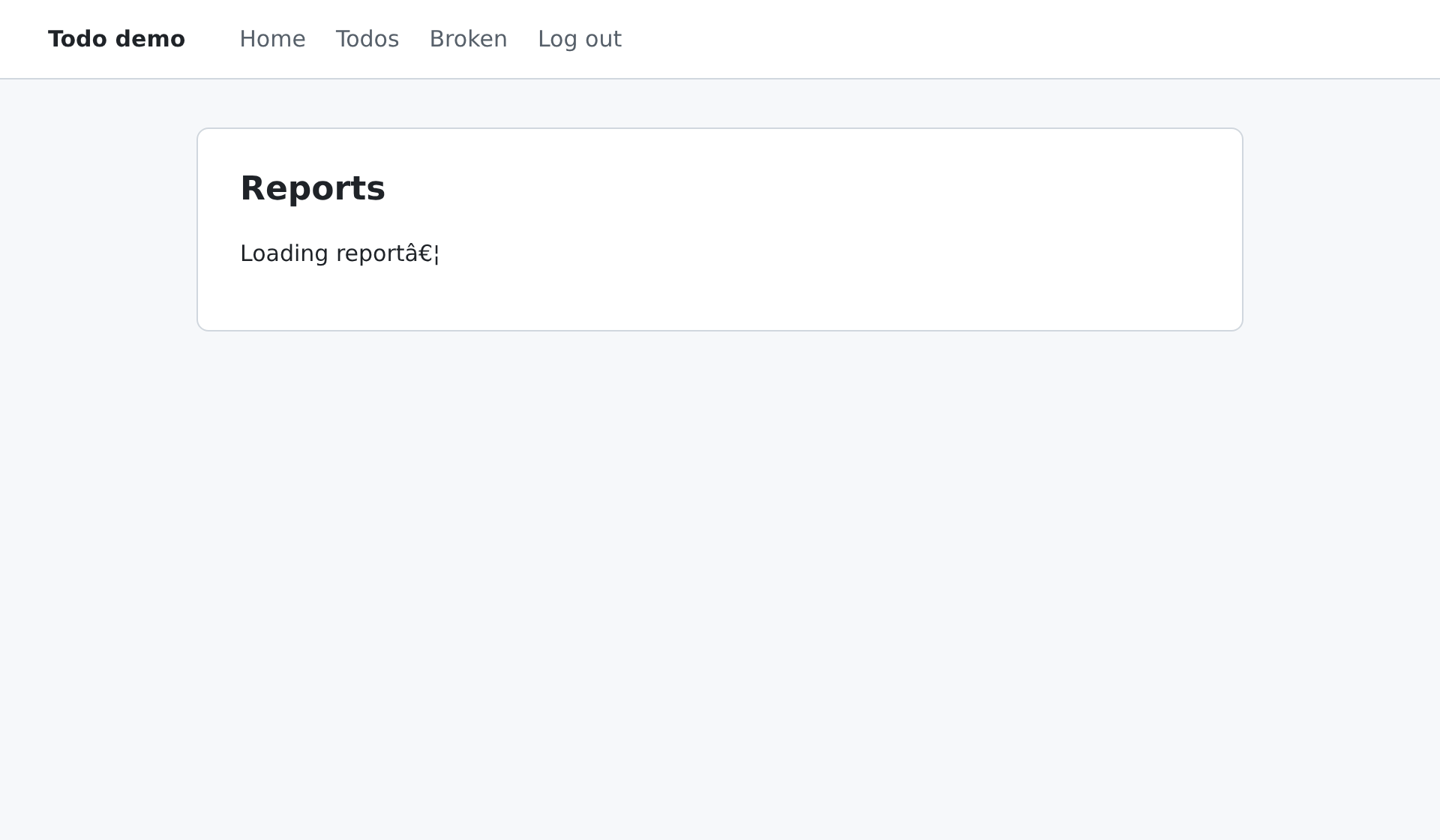
3Catch what looks fine
This page renders without visible problems, but its script throws and its API returns 500. A person clicking through would miss it.
expect.console.noErrors()fails the step.


The run, and its report#
Real output, one browser session for three suites.
Select a step to see its checks, evidence and agent actions.
todos journey
specs/app-agent.qa.ts · app as qa
smoke
specs/app-smoke.qa.ts · app as qa
admin overview
specs/admin-overview.qa.ts · admin
qaspec, regular E2E and agentic E2E#
Regular E2E is a scripted Playwright or Cypress suite. Agentic E2E is e2e by TesterArmy, where an agent acts and asserts but never sees the console or network. The rows where qaspec loses are in the table too: judged checks always call a model, and native mobile apps are out of scope.
| Capability | qaspec | Regular E2E | Agentic E2E (TesterArmy) |
|---|---|---|---|
| Tests written without selectors | Yes | No | Yes Mixed with locators |
| Survives UI changes without edits | Yes | No | Yes |
| Judges the screen like a person | Yes | No | Yes |
| The model sees console errors | Yes | No | No |
| The model sees network requests | Yes | No | No |
| Console and network checks built in | Yes | No | No |
Notes under some marks explain them; on a phone they are in the detailed tables below. Based on the e2e 0.16 docs.
In detail#
The same comparison with the details, plus agent-browser on its own. qaspec sits between scripted tests and an agent you drive by hand. It borrows the agent loop from e2e by TesterArmy, gives the model the console and network that e2e hides, and leaves the browser to agent-browser.
Writing tests
| Capability | qaspec | Scripted E2E | e2e (TesterArmy) | agent-browser alone |
|---|---|---|---|---|
| What you write | Goals and expectations | Locators, waits, helpers | Code plus agent steps agent.act / agent.assert in TypeScript | Prompts to a coding agent |
| Test file | Declarative .qa.ts Parsed, never executed | Executable TS/JS | Executable TypeScript | None No test format |
| Survives UI changes | Yes Replays, then the agent heals | No Selectors break | Yes Plus a replay cache | Partly If you re-prompt |
| Many checks in order, shared state | Yes Steps in a suite | Yes Inside one test | Partly serial groups | Partly Manual |
| Repeatable in CI | Yes Exit codes, JSON, JUnit, --cache strict | Yes | Yes | No Interactive tool |
What a check can see
| Capability | qaspec | Scripted E2E | e2e (TesterArmy) | agent-browser alone |
|---|---|---|---|---|
| Judges the screen like a person | Yes expect('…') with evidence | No | Yes agent.assert | Partly You read it |
| Console errors per step | Yes expect.console.noErrors() | Partly Hand-written listeners | No Hidden from the model | Partly console command |
| Network status per step | Yes expect.network('POST /x').status(201) | Partly waitForResponse | No Hidden from the model | Partly network requests |
| App state (JS, localStorage) | Yes expect.state, expect.storage | Yes page.evaluate | Partly Not to the model | Partly eval |
| Phone-sized layouts | Yes device: 'iPhone 14' | Yes Device descriptors | Yes Viewports, devices | Yes set device |
| Secrets kept from the model | Yes Typed via stdin, redacted | Partly No model involved | Yes | No Whatever you paste |
Running them
| Capability | qaspec | Scripted E2E | e2e (TesterArmy) | agent-browser alone |
|---|---|---|---|---|
| Browsers per run | 1 Chromium by default One tab per project; --jobs N opt-in | 1 context per test Workers in parallel | 1 context per test Workers in parallel | 1 per session You manage it |
| Sign in | Once per identity Saved state reused across runs | Setup project + storageState | Setup test, once per run Sessions are never reused across runs | state save / load by hand |
| Several apps that depend on each other | Yes depends_on, health, captures | Partly Projects, by hand | Partly Targets | No |
| Runtime | One Rust binary + agent-browser | Node + browsers | Node 22.12+ + Playwright | agent-browser |
| Model calls per run | First run: goals and judged checks Then only judged checks | None | Fewer after the first run Replay cache | Every step |
Based on e2e 0.16 and agent-browser 0.27 docs, and on porting a real two-app suite. Scripted E2E means Playwright or Cypress. Corrections welcome as issues.
New since 0.1.0
On main, not in a release yet. Build from source to try it.
- Replay cache
- A goal that passed is recorded as role and name locators. The next run replays it without the model, and the agent takes over only where the page changed. In the demo, a second run went from 8 model calls to 4, and from 24 to 18 seconds.
--cache strictfails on a missing or stale recording, for CI. - Parallel workers
--jobs Nsplits suites across N browsers, keeping each sign-in, dependency and capture in one worker. A memory guard lowers N to what fits at about 1.5 GB per browser. One browser stays the default.- Mobile web
device: 'iPhone 14'on a suite, project or the whole run emulates the phone's size, pixel ratio and user agent, and tells the agent to look for menus and scroll. Suites with a device run last, because agent-browser cannot undo the mobile user agent without relaunching.
Install#
The only runtime dependency is agent-browser. Prebuilt binaries for Linux and macOS are on the release page.
$ npm i -g agent-browser && agent-browser install$ cargo install --git https://github.com/jaivial/qaspec --tag v0.1.0$ qaspec init # qaspec.toml and specs/home.qa.ts$ qaspec check # specs, config and secrets, no browser$ qaspec run
Projects, environments and credentials#
Base URLs, users and secrets live in qaspec.toml. Specs only name them. The examples/shop project is a store and its back office:
import { suite, step, goal, expect, capture } from 'qaspec';

// One journey, several checks in order, one browser, signed in once.
suite('buyer checks out a product', { project: 'store', as: 'buyer', start: '/' }, () => {

  step('find the product', () => {
    goal('search for "${params.product}" and open its product page');
    expect('the product page of "${params.product}" shows a price and an Add to cart button');
    expect.network('GET /api/products/**').status(200);
    expect.console.noErrors();
  });

  step('add it to the cart', () => {
    goal('add one unit to the cart');
    expect('the cart badge shows 1 item');
    expect.network('POST /api/cart/**').status(201);
    expect.storage.local('cartId').exists();
  });

  step('pay', () => {
    goal('go to checkout and pay with the saved card');
    expect('an order confirmation with an order number is shown');
    expect.network.noFailures();
    capture.url('orderUrl');
    capture('orderNumber', 'the order number on the confirmation page');
  });

  // Independent of the previous state thanks to `start`; runs even if checkout failed.
  step('order history lists it', { start: '/account/orders', needs: ['pay'] }, () => {
    expect.visible('${orderNumber}');
  });
});
- Switch environment
--env stagingorQASPEC_ENV- Override a value
--set params.product=…,--set projects.store.base_url=…- A project is down
- Its
healthcheck fails and its suites, plus the projects that depend on it, are reported as blocked rather than failed. - Journey across apps
step('…', { project: 'store' })switches to that app's tab, which keeps its page and session.- Pass data on
capture('orderNumber', …), then${orderNumber}in later steps and files.- Two users in one app
- Suites are grouped by user. Switching saves one sign-in and restores the other, in the same browser.

project: 'admin' opens it in its own tab and checks the todo count captured in the store.Expectations#
Exact checks run first and cost nothing. The model judges only if they pass.
| Call | Checks | Model |
|---|---|---|
expect('…') | The screen and this step's signals. The judge must quote evidence. | 1 call |
expect.console.noErrors() | No console.error or uncaught error during the step | None |
expect.network('POST /api/**').status(201) | Requests made during the step | None |
expect.network.noFailures() | No response with status 400 or above | None |
expect.state('window.x').equals(1) | Any JavaScript expression in the page | None |
expect.url().toContain('/x') | The current URL | None |
expect.visible('Welcome') | Text on the page | None |
expect.storage.local('k').equals('v') | localStorage | None |
The full reference is in the README. Exit codes: 0 passed, 1 failed, 2 blocked, 3 configuration error.